Software guide
How to send WhatsApp from the website, the WPM_KRIVA Windows software, Excel, the PC agent and your own billing software, step by step.
Which one do I need?
All of them use the same account: the same login, password, credits and WhatsApp numbers. Messages from every place go into one queue on the website, which sends them one by one with a safe gap, so 10 or 5,000 numbers can be given in one go.
- Website panel: scan your WhatsApp, send single or bulk, see reports. Nothing to install.
- WPM_KRIVA (Windows): single send, bulk from Excel / CSV, WhatsApp groups, campaign progress, connect WhatsApp by QR or phone number, live connected / disconnected status. Your lists and history stay on your own PC.
- Excel add-in: send straight from your Excel sheet, with the values of each row in the message.
- PC agent: only for accounts in "PC EXE" mode, where WhatsApp runs on your own PC instead of our server.
- API: your billing or ERP software sends bills and messages by one link. See For software makers.
Downloads
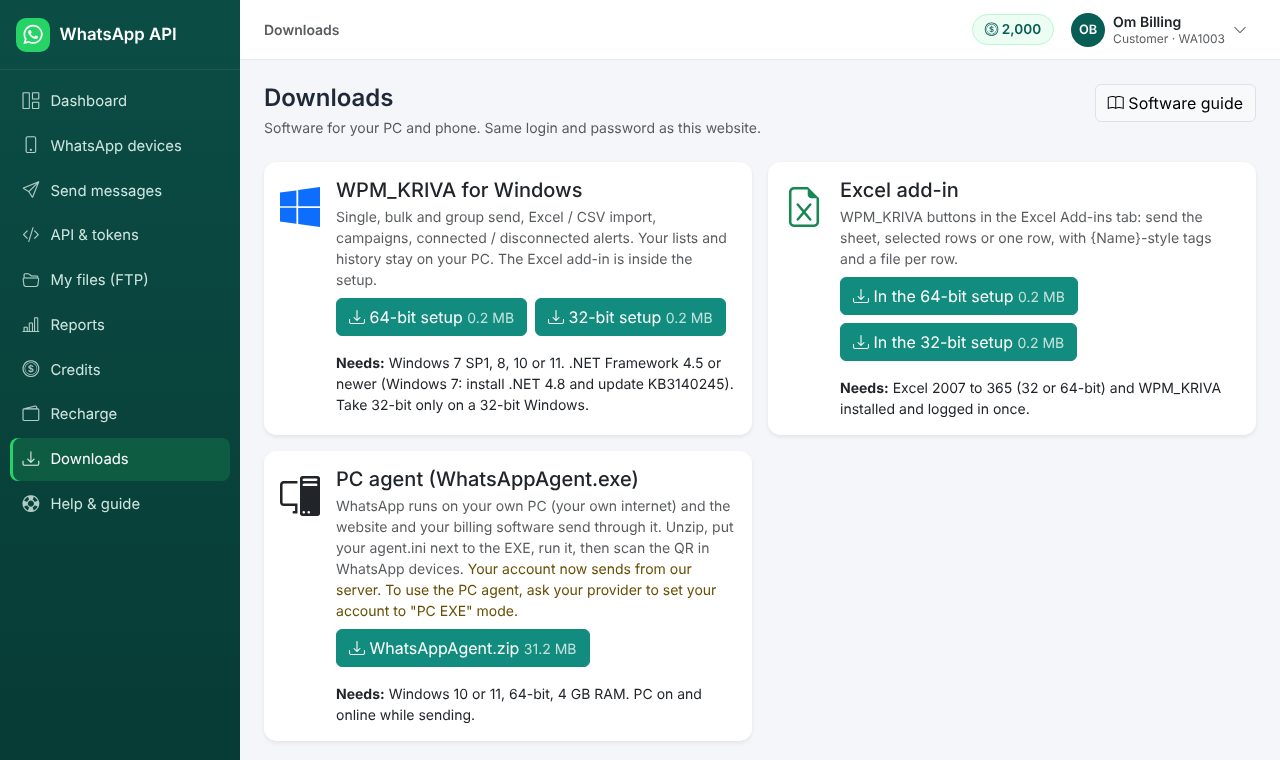
Not sure if your Windows is 32 or 64-bit? Press Windows + Pause (or Settings > System > About) and look at "System type". Take the 64-bit setup when it says 64-bit. After login, the same downloads are on the Downloads page Open Downloads.
Connect your WhatsApp (QR or phone number)
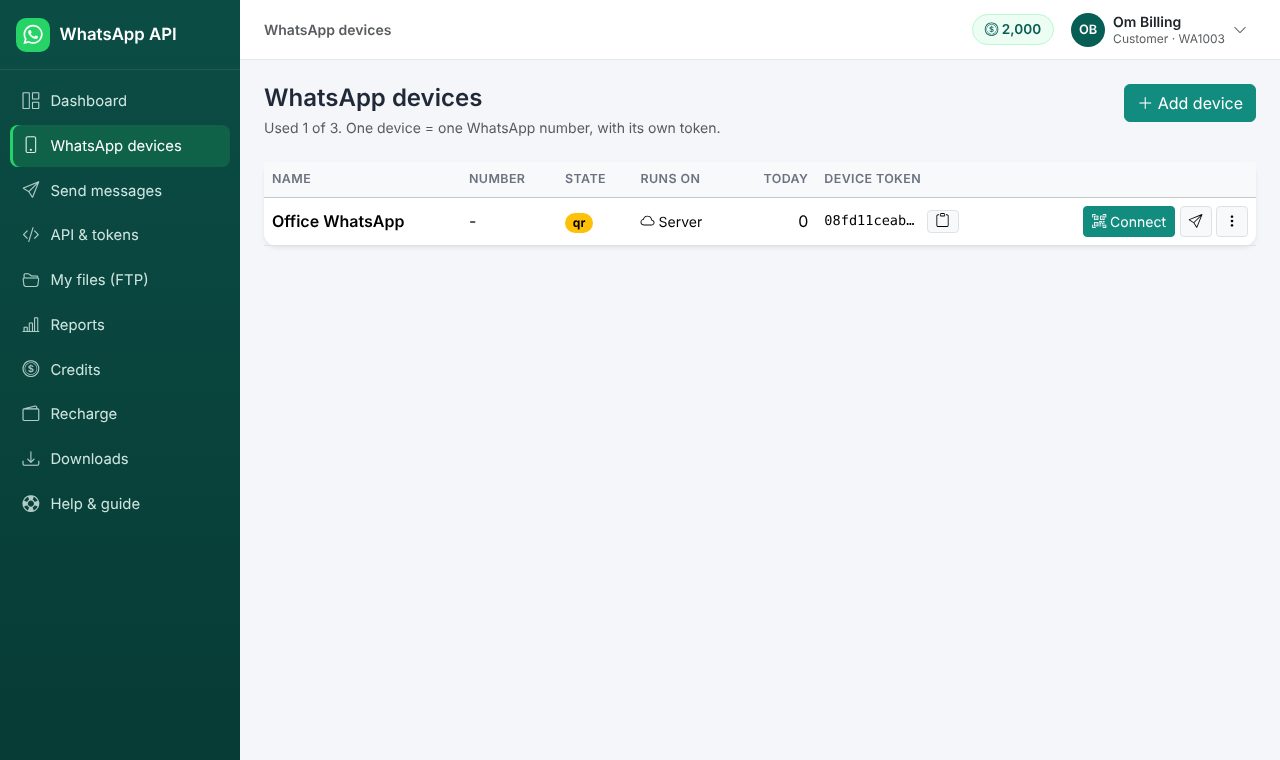
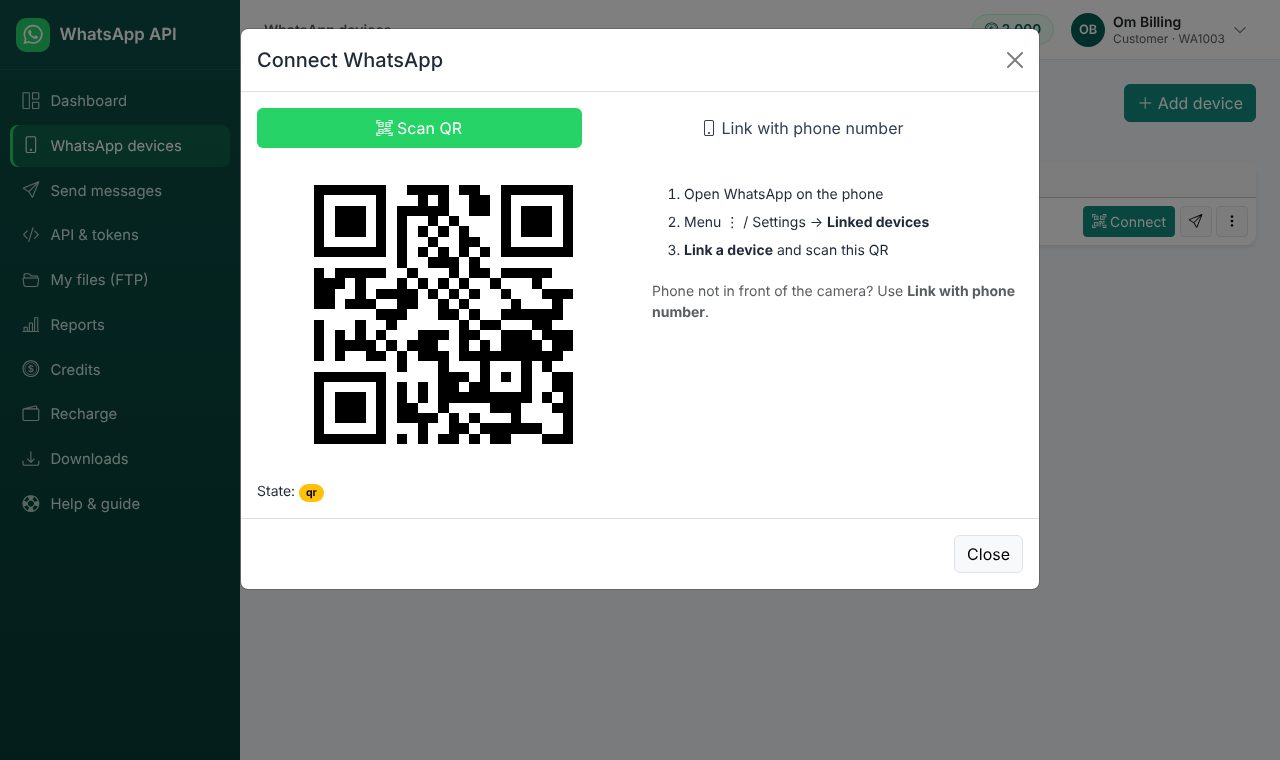
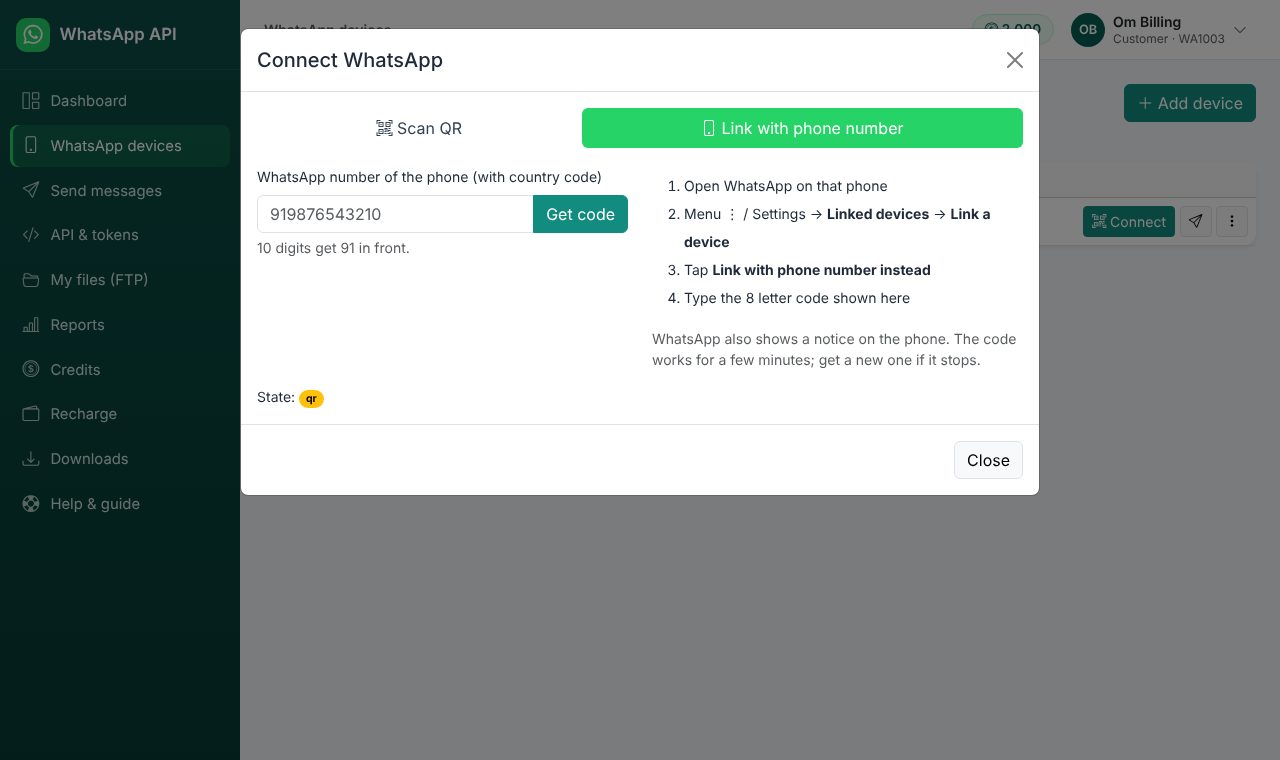
Do this once for each WhatsApp number. It can be done on the website, in WPM_KRIVA (Home > Connect), or from your own software (see code).
WPM_KRIVA Windows software
https://surat.mitalinfosys.info. Log in with the same login (email, mobile or account no.) and password as this website.{Name}-style tags from your headings, add a file if needed, and send. The whole list goes to the website in one go.%APPDATA%\WPM_KRIVA).Excel add-in, full guide
Download a sample sheet Open it, change the rows to your customers, and send.
Install (once)
Make the sheet
| A | B | C | D | E | |
|---|---|---|---|---|---|
| 1 | Name | Mobile | Amount | Due date | File |
| 2 | Ramesh Patel | 9876543210 | 1250 | 20-10-2026 | https://example.com/bills/101.pdf |
| 3 | Sita Shah | 9898012345 | 830 | 22-10-2026 | bill-102.pdf |
| 4 | Amit Kumar | 919825011111 | 2400 | 25-10-2026 |
- Row 1 = headings. Any names. When you send, the add-in asks which column has the mobile numbers and which has the file, and already suggests columns named Mobile / Phone / WhatsApp and File / PDF / Link.
- Mobile: 10 digits (India +91 is added), or with country code. Spaces, + and - are fine. Keep the column as Text so Excel does not change long numbers.
- File (optional): a
https://link, or a file name that is in your FTP folder on this website (e.g.bill-102.pdf). Empty = text only. - Rows hidden by a filter are skipped, so you can filter "unpaid" and send only those.
Send
Dear {Name}, your bill of Rs {Amount} is due on {Due date}. For a long message (more than 255 letters, more lines), write it in a cell, e.g. H2, and type =H2 in the box.PC agent (WhatsAppAgent.exe), step by step
Only for accounts set to PC EXE mode by the admin or reseller. Here WhatsApp itself runs on your PC (your internet), and the website and your software send through it. The API link and token stay the same.
C:\WhatsAppAgent or your billing software's folder. No agent in the list? Click New agent.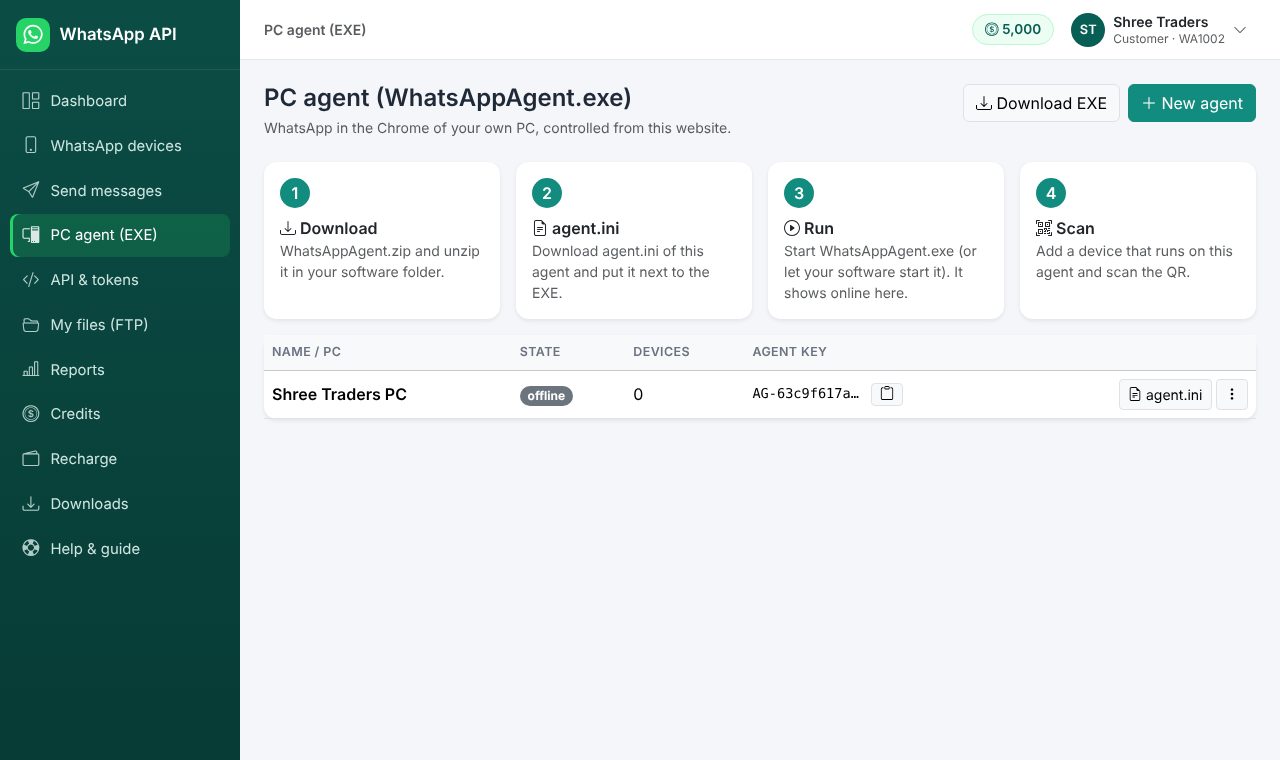
WhatsAppAgent.exe.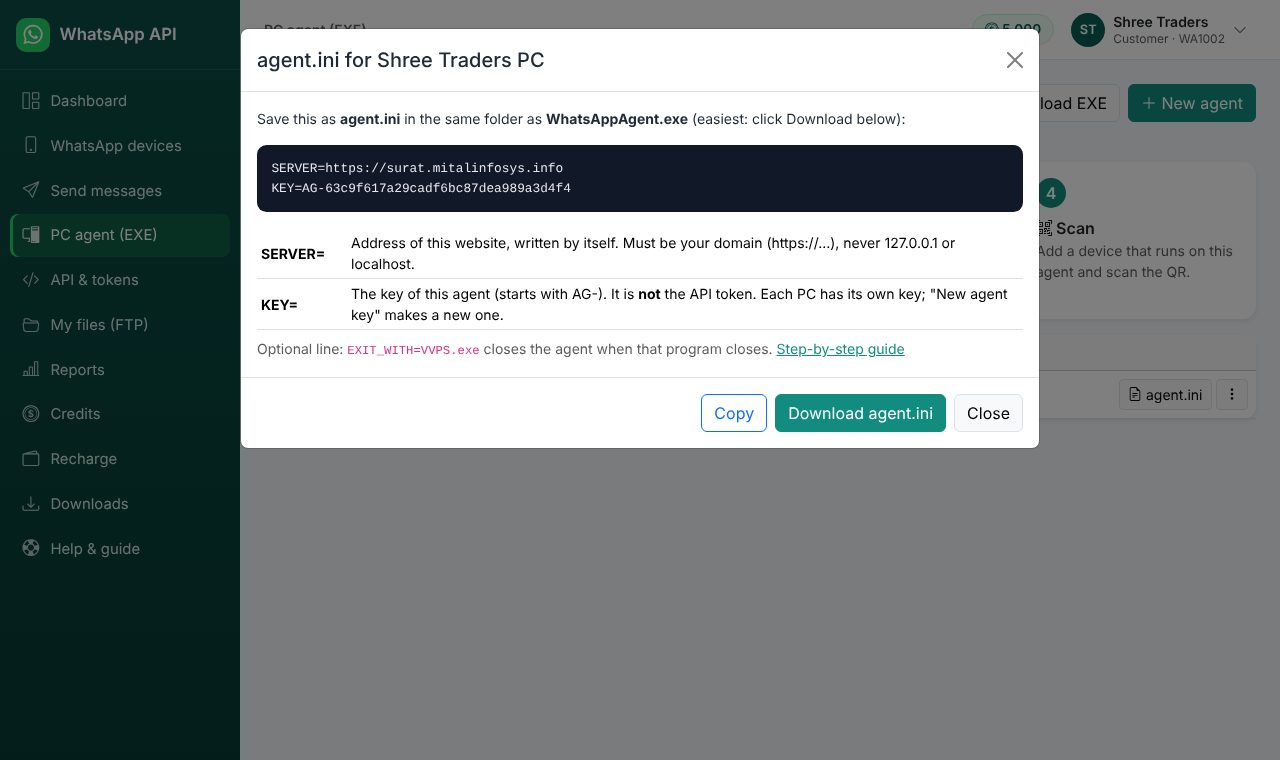
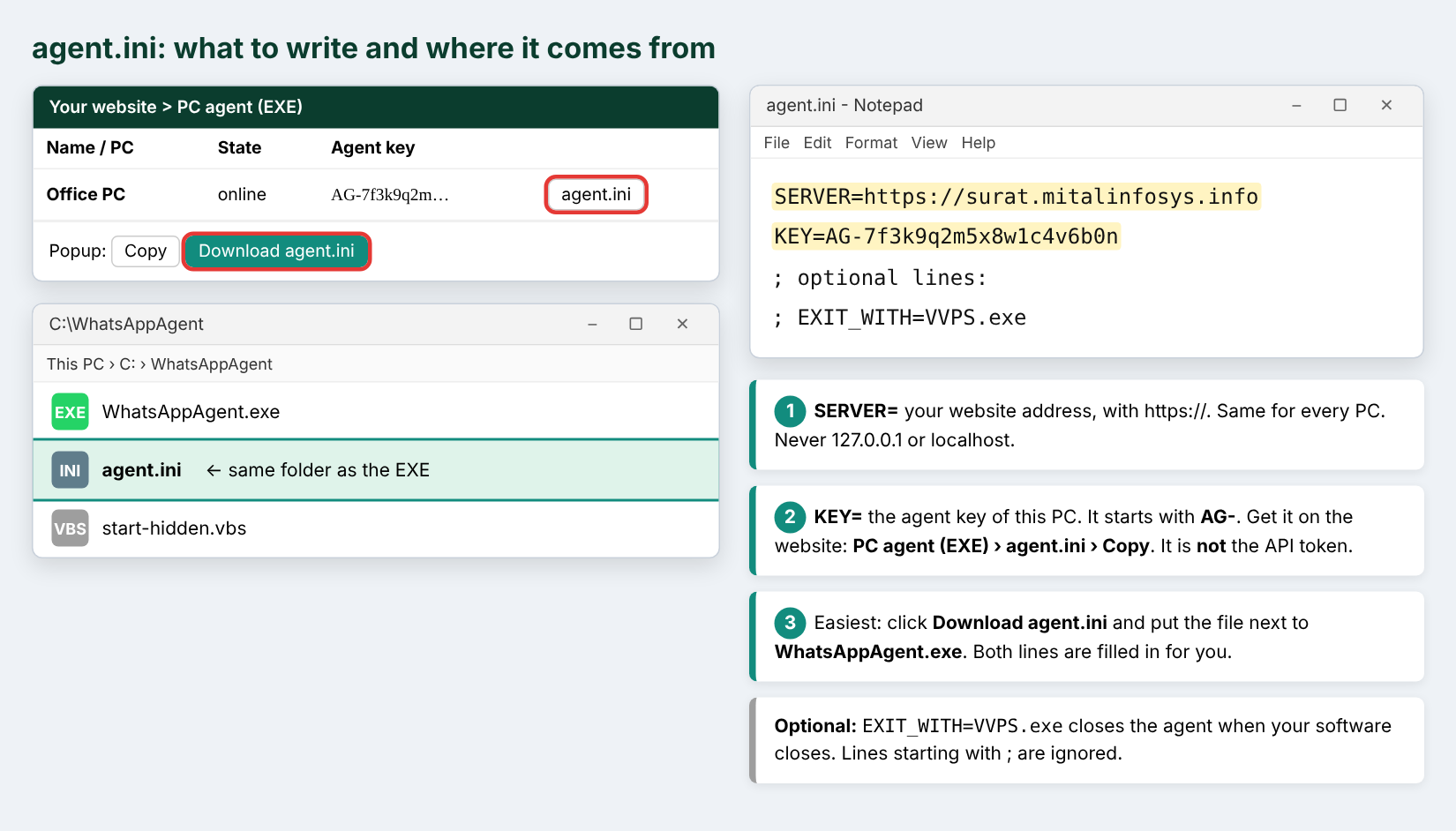
| SERVER= | The address of this website: https://surat.mitalinfosys.info. Never 127.0.0.1 or localhost. |
|---|---|
| KEY= | The agent key of this PC, starts with AG-. Take it only from the PC agent page. It is not the API token and not your password. |
| EXIT_WITH= | (optional) e.g. EXIT_WITH=VVPS.exe: the agent closes when your billing software closes. |
WhatsAppAgent.exe (or start-hidden.vbs for no black window). The window says connected to https://surat.mitalinfosys.info, and the PC agent page shows online. To start with Windows run WhatsAppAgent.exe --startup-on once.For software makers: how to code it
Your billing / ERP / web software talks to this website only by HTTPS. It does not need Node.js, Chrome or WhatsApp on the PC: the website does the WhatsApp part (on our server, or on the customer's PC agent).
https://surat.mitalinfosys.info/api/v1/... with the tokenWhere is the token?
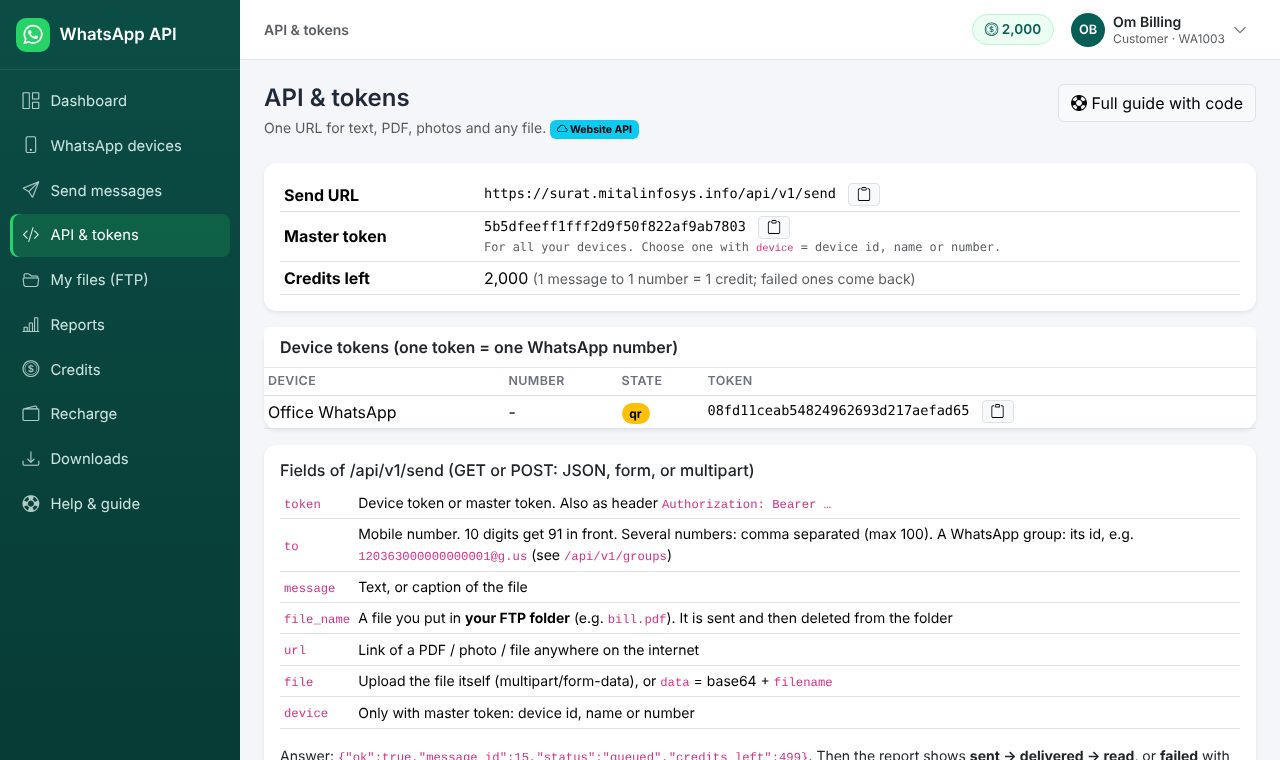
Log in > API & tokens Open API & tokens. Each WhatsApp number (device) has its own API Token: messages with it go from that number. The account also has a Master Token: add &device=ID to choose the number. Keep tokens secret, like a password.
Send a message
GET or POST https://surat.mitalinfosys.info/api/v1/send with token, to (10-digit or with country code, or a group id), message, and optional file_name (FTP folder), url (a link) or file (upload).
' Send one WhatsApp message (needs .NET 4.5+; TLS 1.2 for https)
Net.ServicePointManager.SecurityProtocol = CType(3072, Net.SecurityProtocolType)
Dim wc As New Net.WebClient()
wc.Encoding = Text.Encoding.UTF8
Dim url = "https://surat.mitalinfosys.info/api/v1/send?token=API_TOKEN&to=9876543210&message=" & Uri.EscapeDataString("Your bill of Rs 1250 is ready")
Dim answer As String = wc.DownloadString(url)   ' {"ok":true,"id":31,"status":"queued",...}
' with a PDF from your FTP folder:  &file_name=bill-101.pdf      with a link:  &url=https://.../bill.pdf
System.Net.ServicePointManager.SecurityProtocol = (System.Net.SecurityProtocolType)3072; // TLS 1.2
using (var wc = new System.Net.WebClient { Encoding = System.Text.Encoding.UTF8 }) {
var url = "https://surat.mitalinfosys.info/api/v1/send?token=API_TOKEN&to=9876543210&message=" + Uri.EscapeDataString("Your bill is ready");
string answer = wc.DownloadString(url); // {"ok":true,"id":31,"status":"queued"}
}' Visual Basic 6, Excel / Access VBA, FoxPro (same idea): MSXML2
Dim h As Object
Set h = CreateObject("MSXML2.ServerXMLHTTP.6.0")
h.Open "POST", "https://surat.mitalinfosys.info/api/v1/send", False
h.setRequestHeader "Content-Type", "application/x-www-form-urlencoded"
h.send "token=API_TOKEN&to=9876543210&message=Your%20bill%20is%20ready"
MsgBox h.responseText<?php $url = "https://surat.mitalinfosys.info/api/v1/send?" . http_build_query([ 'token' => 'API_TOKEN', 'to' => '9876543210', 'message' => 'Your bill is ready', // 'file_name' => 'bill-101.pdf', // file in your FTP folder ]); echo file_get_contents($url);
import requests
r = requests.post("https://surat.mitalinfosys.info/api/v1/send", data={
    "token": "API_TOKEN", "to": "9876543210", "message": "Your bill is ready"})
print(r.json())   # {'ok': True, 'id': 31, 'status': 'queued'}
const q = new URLSearchParams({ token: 'API_TOKEN', to: '9876543210', message: 'Your bill is ready' });
const r = await fetch('https://surat.mitalinfosys.info/api/v1/send?' + q);
console.log(await r.json());curl "https://surat.mitalinfosys.info/api/v1/send" -d token=API_TOKEN -d to=9876543210 -d "message=Your bill is ready" # with a PDF from this PC: curl "https://surat.mitalinfosys.info/api/v1/send" -F token=API_TOKEN -F to=9876543210 -F "message=Bill" -F file=@bill.pdf
Mobile numbers: any shape, one or many
Write the number the way your software has it. The website keeps the last 10 digits and puts 91 in front by itself, so these all become 919725118401:
9725118401 | +91 97251 18401 | 97251 18401 | 097251-18401 | 0091 9725118401 |
Many numbers in one call (or one column): separate them with a comma, a new line, or a space between two full numbers: 9725118401,9876543210 | +91 97251 18401 +91 98765 43210. Every number gets the same message (up to 100 numbers in one call; use /api/v1/bulk for more). The same number twice is sent once.
A wrong number (too short, or not starting with 6, 7, 8, 9) is not sent and costs no credit. It is shown in the answer under invalid with the reason, and it stays in Reports as Failed. The good numbers of the same call still go.
If the WhatsApp is not connected (messages wait)
When the QR is not scanned, the phone logged out, or the PC agent is off, the request is not lost. The answer is "status":"pending" with a message_id; the message is saved and shows as Waiting in Reports. As soon as the WhatsApp is connected again it goes out by itself, in order. If it stays unconnected for the number of days set by the owner (normally 7), the message fails and the credit comes back. The owner may also WhatsApp / email the customer "please connect, messages are waiting".
<?php
// several numbers typed in one column, in any shape
$numbers = "+91 97251 18401, 98765 43210";
$url = "https://surat.mitalinfosys.info/api/v1/send?" . http_build_query([
  'token' => 'API_TOKEN', 'to' => $numbers, 'message' => 'Your bill of Rs 1250 is ready']);
$a = json_decode(file_get_contents($url), true);
if (!empty($a['invalid'])) { /* wrong numbers: $a['invalid'][0]['error'] */ }
if (($a['status'] ?? '') === 'pending') { /* saved, goes when WhatsApp connects: $a['waiting'] */ }
const q = new URLSearchParams({ token: 'API_TOKEN', to: '+91 97251 18401, 98765 43210', message: 'Your bill is ready' });
const a = await (await fetch('https://surat.mitalinfosys.info/api/v1/send?' + q)).json();
if (a.invalid) console.log('wrong numbers:', a.invalid);
if (a.status === 'pending' || (a.results || []).some((x) => x.status === 'pending')) console.log('waiting for WhatsApp:', a.waiting);Net.ServicePointManager.SecurityProtocol = CType(3072, Net.SecurityProtocolType)
Dim wc As New Net.WebClient() : wc.Encoding = Text.Encoding.UTF8
Dim nums As String = txtMobile.Text ' e.g. "+91 97251 18401, 98765 43210" - send it as it is
Dim url = "https://surat.mitalinfosys.info/api/v1/send?token=API_TOKEN&to=" & Uri.EscapeDataString(nums) & "&message=" & Uri.EscapeDataString("Your bill is ready")
Dim answer As String = wc.DownloadString(url)
If answer.Contains("""status"":""pending""") Then MsgBox("Saved. It will go when the WhatsApp is connected.")
If answer.Contains("""invalid""") Then MsgBox("Some numbers are wrong: " & answer)Show the QR / connect from your own software
So your customer never needs to open this website: check /api/v1/status; while it is not connected show the PNG from /api/v1/qr?format=image and refresh it every 5 seconds. Or use the phone code, or the ready scan page.
' Show the WhatsApp QR inside your own software (PictureBox1), till it is connected
Net.ServicePointManager.SecurityProtocol = CType(3072, Net.SecurityProtocolType)
Dim wc As New Net.WebClient()
Dim st As String = wc.DownloadString("https://surat.mitalinfosys.info/api/v1/status?token=API_TOKEN")      ' "connected":true when linked
If Not st.Contains("""connected"":true") Then
    Dim png As Byte() = wc.DownloadData("https://surat.mitalinfosys.info/api/v1/qr?token=API_TOKEN&format=image")
    PictureBox1.Image = Drawing.Image.FromStream(New IO.MemoryStream(png))
End If
' Call this from a Timer every 5 seconds: the QR changes about every 20 seconds.
var wc = new System.Net.WebClient();
string st = wc.DownloadString("https://surat.mitalinfosys.info/api/v1/status?token=API_TOKEN");
if (!st.Contains("\"connected\":true")) {
byte[] png = wc.DownloadData("https://surat.mitalinfosys.info/api/v1/qr?token=API_TOKEN&format=image");
pictureBox1.Image = System.Drawing.Image.FromStream(new System.IO.MemoryStream(png));
} // run every 5 s with a Timer till connected<!-- only on a page of your own that needs a login: the token is visible in the page source. The image refreshes itself. -->
<img id="qr" src="https://surat.mitalinfosys.info/api/v1/qr?token=API_TOKEN&format=image" width="260">
<script>setInterval(() => { document.getElementById('qr').src = 'https://surat.mitalinfosys.info/api/v1/qr?token=API_TOKEN&format=image&t=' + Date.now(); }, 5000);</script># No camera? Link with the phone number instead: answer has an 8-letter code
curl "https://surat.mitalinfosys.info/api/v1/pair?token=API_TOKEN&phone=9876543210"
# {"ok":true,"code":"ABCD-EFGH"} -> WhatsApp > Linked devices > Link a device > Link with phone number instead# Easiest: open this page in the browser (no login needed). It shows the QR and the phone-code option.
curl "https://surat.mitalinfosys.info/api/v1/scan-link?token=API_TOKEN"
# {"ok":true,"url":"https://surat.mitalinfosys.info/scan/1a2b3c..."} -> open the url, or send it to your customerAll calls
| Call | What it does |
|---|---|
/api/v1/send | One message (text, file, link). Answer: {"ok":true,"id":31,"status":"queued"} |
POST /api/v1/bulk | Many numbers in one call (JSON {"items":[{"to":"98…","message":"…"}]} or numbers + message). Answer has a campaign id. |
/api/v1/message?id=31 | Status of a message: queued, sent, delivered, read, failed. |
/api/v1/status | Is the WhatsApp number connected? {"connected":true,"number":"91…"} |
/api/v1/qr, /api/v1/pair, /api/v1/scan-link | Connect the number: QR image, 8-letter phone code, or the ready scan page. |
/api/v1/balance | Credits left, valid till, sent today. |
token=GP… (number group token) | Use it in /api/v1/send and /api/v1/bulk like a normal token: each message goes from the next free number of the group (turn by turn or one by one), with the group's gap and daily limit. Answer: "status":"pending" + message_id. |
/api/v1/groups-of-numbers | Your number groups with their tokens and numbers (Master Token). Or send with Master Token + group=Group name. Full guide: Number group API. |
/api/v1/groups | WhatsApp groups of the number (id to send to a group). |
/api/v1/campaigns, /api/v1/campaign?id= | Bulk progress. |
More examples and every option: log in > Help & guide Open Help.
Number group API (several numbers, one token)
A number group puts 2, 3 or more of your WhatsApp numbers under one group token (it starts with GP). Your software sends exactly as with a normal token; the website chooses the number for each message, keeps the gap and the daily limit of every number, and goes on with the other numbers when one is off. Open Number groups
Set it up (once)
group=Group name.What happens to one message, step by step
/api/v1/send?token=GP… with to and messagemessage_id and "status":"pending" at oncequeued → sent → delivered → read, and from_number shows which number sent itNo number free (all offline, or all used up for today)? The message is not lost: it stays pending and goes by itself when a number is connected again, or the next day. A message that fails gives its credit back. If number groups are switched off for the account, waiting group messages fail with a clear error and their credits come back.
Calls
| Call | Token | What it does |
|---|---|---|
GET/POST /api/v1/send | group token | One message (or up to 100 numbers comma separated). Same fields as normal: to, message, url, file_name, file. Answer: message_id + "status":"pending". |
POST /api/v1/bulk | group token | Many numbers in one call; each goes from the next free number. Answer: campaign_id. |
GET /api/v1/message?id= | group or master | Status of one message, with from_number / from_name once a number took it. |
GET /api/v1/campaign?id= | group or master | Progress of a bulk send. |
GET /api/v1/groups-of-numbers | master | Your groups with token, mode, numbers in order, connected, sent today / limit, waiting. |
/api/v1/send?token=MASTER&group=Name | master | Same as the group token; group = group name or id. |
POST /api/v1/app-login | login + password | For WPM_KRIVA: answer has groups_allowed and number_groups (with tokens). |
Code
# 1. Send one message through the number group (group token GP...)
curl "https://surat.mitalinfosys.info/api/v1/send?token=GP_GROUP_TOKEN&to=9876543210&message=Hello%20from%20our%20shop"
# -> {"ok":true,"message_id":31,"status":"pending","group":"Sales","credits_left":499}

# 2. A few seconds later: which number sent it, and how it went
curl "https://surat.mitalinfosys.info/api/v1/message?token=GP_GROUP_TOKEN&id=31"
# -> {"ok":true,"message":{"id":31,"status":"sent","from_number":"919811111111",...}}

# 3. With a PDF: add &url=https://yoursite.com/bill-101.pdf  or  &file_name=bill-101.pdf (FTP folder)

# 4. Many numbers in one call (each one goes from the next free number)
curl -X POST "https://surat.mitalinfosys.info/api/v1/bulk" -H "Content-Type: application/json" \
  -d '{"token":"GP_GROUP_TOKEN","numbers":"9876543210,9876543211,9876543212","message":"Diwali offer"}'

# 5. Master Token + group name (instead of the group token)
curl "https://surat.mitalinfosys.info/api/v1/send?token=MASTER_TOKEN&group=Sales&to=9876543210&message=Hello"

# 6. Your groups, their tokens, numbers, today's use
curl "https://surat.mitalinfosys.info/api/v1/groups-of-numbers?token=MASTER_TOKEN"
<?php
$base = "https://surat.mitalinfosys.info/api/v1";
$token = "GP_GROUP_TOKEN"; // number group token
function call($url) { // GET and read the JSON answer (also on HTTP 4xx)
$ctx = stream_context_create(["http" => ["ignore_errors" => true, "timeout" => 30]]);
return json_decode(file_get_contents($url, false, $ctx), true);
}
// 1. send: saved at once as "pending"; the group picks the number
$r = call("$base/send?" . http_build_query([
"token" => $token, "to" => "9876543210", "message" => "Your bill of Rs 1250 is ready",
// "url" => "https://yoursite.com/bill-101.pdf",
]));
if (!$r["ok"]) die("Not sent: " . $r["error"]);
$id = $r["message_id"];
if (!empty($r["waiting"])) echo $r["waiting"] . "\n"; // e.g. every number used up for today
// 2. ask a few times which number sent it
for ($i = 0; $i < 10; $i++) {
sleep(3);
$m = call("$base/message?" . http_build_query(["token" => $token, "id" => $id]))["message"];
if ($m["status"] != "pending") { echo $m["status"] . " from " . $m["from_number"]; break; }
}// Node.js 18+ (fetch is built in)
const base = 'https://surat.mitalinfosys.info/api/v1';
const token = 'GP_GROUP_TOKEN'; // number group token
const get = async (path, q) => (await fetch(base + path + '?' + new URLSearchParams({ token, ...q }))).json();
async function main() {
const r = await get('/send', { to: '9876543210', message: 'Your bill of Rs 1250 is ready' });
if (!r.ok) throw new Error(r.error); // e.g. no permission, group not found
console.log('saved', r.message_id, r.status, r.waiting || '');
for (let i = 0; i < 10; i++) { // pending -> queued / sent -> delivered -> read
await new Promise((ok) => setTimeout(ok, 3000));
const m = (await get('/message', { id: r.message_id })).message;
if (m.status !== 'pending') { console.log(m.status, 'from', m.from_number); break; }
}
// many numbers: POST /bulk
const b = await (await fetch(base + '/bulk', { method: 'POST', headers: { 'Content-Type': 'application/json' },
body: JSON.stringify({ token, numbers: ['9876543210', '9876543211'], message: 'Diwali offer' }) })).json();
console.log(b); // { ok, campaign_id, queued, group }
}
main();import time, requests
BASE = "https://surat.mitalinfosys.info/api/v1"
TOKEN = "GP_GROUP_TOKEN" # number group token
r = requests.get(BASE + "/send", params={"token": TOKEN, "to": "9876543210",
"message": "Your bill of Rs 1250 is ready"}, timeout=30).json()
if not r["ok"]:
raise SystemExit("Not sent: " + r["error"])
msg_id = r["message_id"] # status "pending": the group picks the number
for _ in range(10): # which number sent it?
time.sleep(3)
m = requests.get(BASE + "/message", params={"token": TOKEN, "id": msg_id}, timeout=30).json()["message"]
if m["status"] != "pending":
print(m["status"], "from", m["from_number"])
break
# many numbers in one call
print(requests.post(BASE + "/bulk", json={"token": TOKEN, "numbers": "9876543210,9876543211",
"message": "Diwali offer"}, timeout=60).json())using System; using System.IO; using System.Net; using System.Threading;
ServicePointManager.SecurityProtocol = (SecurityProtocolType)3072; // TLS 1.2
string b = "https://surat.mitalinfosys.info/api/v1", tok = "GP_GROUP_TOKEN"; // number group token
string Get(string url) { // the answer is JSON also on errors (HTTP 400/403/404)
try { using (var wc = new WebClient { Encoding = System.Text.Encoding.UTF8 }) return wc.DownloadString(url); }
catch (WebException e) when (e.Response != null) { return new StreamReader(e.Response.GetResponseStream()).ReadToEnd(); }
}
string ans = Get(b + "/send?token=" + tok + "&to=9876543210&message=" + Uri.EscapeDataString("Your bill is ready"));
// {"ok":true,"message_id":31,"status":"pending","group":"Sales"}
if (!ans.Contains("\"ok\":true")) { Console.WriteLine(ans); return; }
string id = ans.Split(new[] { "\"message_id\":" }, StringSplitOptions.None)[1].Split(',', '}')[0];
for (int i = 0; i < 10; i++) {
Thread.Sleep(3000);
string st = Get(b + "/message?token=" + tok + "&id=" + id);
if (!st.Contains("\"status\":\"pending\"")) { Console.WriteLine(st); break; } // has "from_number"
}Imports System.Net
' accounting / billing software in VB.NET (.NET 4.5+). Call SendBill("9876543210", "Your bill is ready")
Module WhatsAppGroup
Const BASE_URL As String = "https://surat.mitalinfosys.info/api/v1"
Const GROUP_TOKEN As String = "GP_GROUP_TOKEN" ' number group token
Function GetUrl(url As String) As String
ServicePointManager.SecurityProtocol = CType(3072, SecurityProtocolType) ' TLS 1.2
Try
Using wc As New WebClient()
wc.Encoding = Text.Encoding.UTF8
Return wc.DownloadString(url)
End Using
Catch e As WebException When e.Response IsNot Nothing
Return New IO.StreamReader(e.Response.GetResponseStream()).ReadToEnd() ' error answer is JSON too
End Try
End Function
Sub SendBill(mobile As String, text As String)
Dim ans = GetUrl(BASE_URL & "/send?token=" & GROUP_TOKEN & "&to=" & mobile & "&message=" & Uri.EscapeDataString(text))
If Not ans.Contains("""ok"":true") Then MsgBox(ans) : Exit Sub ' {"ok":false,"error":"..."}
Dim id = ans.Split({"""message_id"":"}, StringSplitOptions.None)(1).Split(","c, "}"c)(0)
For i = 1 To 10
Threading.Thread.Sleep(3000)
Dim st = GetUrl(BASE_URL & "/message?token=" & GROUP_TOKEN & "&id=" & id)
If Not st.Contains("""status"":""pending""") Then MsgBox(st) : Exit For ' shows from_number
Next
End Sub
End Module' VB6 / old accounting software that can call a web link
' (Windows 7: install KB3140245 for TLS 1.2)
Private Const BASE_URL = "https://surat.mitalinfosys.info/api/v1"
Private Const GROUP_TOKEN = "GP_GROUP_TOKEN"
Function UrlEnc(ByVal s As String) As String
Dim i As Long, c As String
For i = 1 To Len(s)
c = Mid(s, i, 1)
If c Like "[A-Za-z0-9.~_-]" Then UrlEnc = UrlEnc & c Else UrlEnc = UrlEnc & "%" & Right("0" & Hex(Asc(c)), 2)
Next
End Function
Function GetUrl(ByVal url As String) As String
Dim h As Object
Set h = CreateObject("MSXML2.ServerXMLHTTP.6.0")
h.Open "GET", url, False
h.Send
GetUrl = h.responseText ' JSON, also for errors
End Function
' read one value from the JSON answer (no library needed)
Function JVal(ByVal s As String, ByVal k As String) As String
Dim p As Long, q As Long
p = InStr(s, """" & k & """:")
If p = 0 Then Exit Function
p = p + Len(k) + 3
If Mid(s, p, 1) = """" Then
p = p + 1: q = InStr(p, s, """")
Else
q = p
Do While q <= Len(s) And InStr(",}", Mid(s, q, 1)) = 0: q = q + 1: Loop
End If
JVal = Mid(s, p, q - p)
End Function
Sub SendBill()
Dim ans As String, id As String, st As String, i As Integer
ans = GetUrl(BASE_URL & "/send?token=" & GROUP_TOKEN & "&to=9876543210&message=" & UrlEnc("Your bill of Rs 1250 is ready"))
If JVal(ans, "ok") <> "true" Then MsgBox "Not sent: " & JVal(ans, "error"): Exit Sub
id = JVal(ans, "message_id")
For i = 1 To 10
Sleep3
st = GetUrl(BASE_URL & "/message?token=" & GROUP_TOKEN & "&id=" & id)
If JVal(st, "status") <> "pending" Then MsgBox JVal(st, "status") & " from " & JVal(st, "from_number"): Exit For
Next
End Sub
Sub Sleep3() ' wait 3 seconds
Dim t As Single: t = Timer
Do While Timer < t + 3: DoEvents: Loop
End Sub' Excel: column A = mobile, B = name, C = amount, row 1 = headings.
' "SendFromGroup" writes the message id in D; "CheckStatus" writes status in E and the number that sent it in F.
Const BASE_URL = "https://surat.mitalinfosys.info/api/v1"
Const GROUP_TOKEN = "GP_GROUP_TOKEN"
Function GetUrl(ByVal url As String) As String
Dim h As Object
Set h = CreateObject("MSXML2.ServerXMLHTTP.6.0")
h.Open "GET", url, False
h.Send
GetUrl = h.responseText
End Function
' read one value from the JSON answer (no library needed)
Function JVal(ByVal s As String, ByVal k As String) As String
Dim p As Long, q As Long
p = InStr(s, """" & k & """:")
If p = 0 Then Exit Function
p = p + Len(k) + 3
If Mid(s, p, 1) = """" Then
p = p + 1: q = InStr(p, s, """")
Else
q = p
Do While q <= Len(s) And InStr(",}", Mid(s, q, 1)) = 0: q = q + 1: Loop
End If
JVal = Mid(s, p, q - p)
End Function
Sub SendFromGroup()
Dim r As Long, msg As String, ans As String
For r = 2 To Cells(Rows.Count, 1).End(xlUp).Row
msg = "Hello " & Cells(r, 2).Value & ", your bill of Rs " & Cells(r, 3).Value & " is ready."
ans = GetUrl(BASE_URL & "/send?token=" & GROUP_TOKEN & "&to=" & Cells(r, 1).Value & _
"&message=" & WorksheetFunction.EncodeURL(msg)) ' EncodeURL: Excel 2013+
If JVal(ans, "ok") = "true" Then Cells(r, 4).Value = JVal(ans, "message_id") Else Cells(r, 5).Value = JVal(ans, "error")
Next
MsgBox "Saved. The group sends them one by one; run CheckStatus after a minute."
End Sub
Sub CheckStatus()
Dim r As Long, st As String
For r = 2 To Cells(Rows.Count, 1).End(xlUp).Row
If Cells(r, 4).Value <> "" Then
st = GetUrl(BASE_URL & "/message?token=" & GROUP_TOKEN & "&id=" & Cells(r, 4).Value)
Cells(r, 5).Value = JVal(st, "status")
Cells(r, 6).Value = JVal(st, "from_number")
End If
Next
End SubAnswers
{
  "ok": true,
  "message_id": 31,
  "status": "pending",
  "group": "Sales",
  "credits_left": 499
}{
"ok": true,
"message_id": 32,
"status": "pending",
"group": "Sales",
"credits_left": 498,
"waiting": "Waiting: every connected number of group \"Sales\" reached its daily limit; sending goes on tomorrow by itself."
}{
"ok": true,
"message": {
"id": 31,
"device_id": 7,
"from_name": "Shop 2",
"from_number": "919811111112",
"group_id": 3,
"group_name": "Sales",
"to_number": "919876543210",
"type": "text",
"status": "sent",
"error": "",
"created_at": "2026-10-16 11:20:04",
"updated_at": "2026-10-16 11:20:09",
"sent_at": "2026-10-16 11:20:06"
}
}{
"ok": true,
"message": {
"id": 32,
"device_id": null,
"from_number": null,
"group_id": 3,
"group_name": "Sales",
"to_number": "919876543211",
"status": "pending",
"waiting": "Waiting: no number of group \"Sales\" is connected."
}
}{
"ok": true,
"campaign_id": 12,
"queued": 3,
"invalid": 0,
"invalid_list": [],
"group": "Sales",
"credits_left": 496
}{
"ok": true,
"allowed": true,
"groups": [
{
"id": 3,
"name": "Sales",
"mode": "rotate",
"sticky": false,
"gap": 10,
"daily": 200,
"token": "GP…",
"connected": 3,
"waiting": 0,
"next_device_id": 6,
"numbers": [
{
"device_id": 6,
"name": "Shop 1",
"number": "919811111111",
"state": "connected",
"order": 1,
"daily_limit": 200,
"sent_today": 41,
"left_today": 159,
"runs_on": "server"
}
]
}
]
}{
"ok": false,
"error": "Number groups are switched off for this account (permission removed by your provider). Messages through the group are not sent; ask your provider to switch it on again, or send from one number."
}{
"ok": false,
"error": "Number group \"Salse\" not found in this account."
}{
"ok": false,
"error": "Wrong token."
}More features, step by step
Where a feature is in the menu is shown in a grey bar. Videos you add in Settings › Rules, terms & videos are listed at the end of this guide.
1. Login: three ways, one password
Every customer can log in with any one of these (same password):
- the account number (for example
WA1005), - the mobile number: only the 10 digits, no 91 and no +,
- the email given in the account.
If two accounts have the same mobile number, the password decides which one opens.
2. Send to two or more numbers, or from two or more WhatsApp numbers
Two mobile numbers, one message: put them in to, separated by a comma (up to 100 in one call):
https://surat.mitalinfosys.info/api/v1/send?token=API_TOKEN&to=9725118401,9876543210&message=Hello
Choose which of your WhatsApp numbers sends: with the Master Token add device (id, name or number):
https://surat.mitalinfosys.info/api/v1/send?token=MASTER_TOKEN&device=2&to=9725118401&message=Hello
Let the website choose a free number: make a Number group (menu Number groups) and send with its group token (starts with GP). It uses the numbers one after the other and skips a number that is off or has reached its daily limit.
3. WhatsApp not connected: where the message waits
- Your software calls the API as usual. The answer is
"status":"pending"with amessage_id. Nothing is lost and the credit is kept. - The message waits on the server and shows as Waiting in Reports (filter Waiting), and as an hourglass with a number in the top bar.
- When the WhatsApp is connected again (scan the QR, or the phone comes back) all waiting messages go out by themselves, in order.
- If it stays off for more days than set (default 7), the message fails and the credit comes back.
- Automatic warning to the customer: when the customer has the set number of waiting messages (default 5), or the oldest has waited the set hours (default 24), the website sends "please connect your WhatsApp" by mail and WhatsApp, once a day.
OTP codes and Bot replies are never kept waiting: they would be too late.
4. Bot (auto reply)
- When: the whole message is one of the words / the message starts with / has the word / Welcome (first message of a new person) / anything else.
- Reply is: a text, or a tap-to-choose poll. Use
{name}if you want the person's name. - Safety: each rule has a wait time per person, a limit per person per hour and per number per day, groups and your own numbers are never answered.
- Every answer (sent, failed, skipped and why) is listed under the rules.
- Menu 1, 2, 3: make one rule per word (
1,2,3) and a Welcome rule that lists them. - Poll note: WhatsApp does not always tell our server which option was tapped, so the reply to a poll tap can not be promised. Use words (the person types 1, 2 or 3) when the answer must be sure.
5. Waiting list (messages that have not gone out)
The dashboard shows how many messages are Waiting. Open Waiting list to see whose they are: the account, the WhatsApp number, how many, how long the oldest waited, and when the last alert was sent. A message waits because the WhatsApp is not connected (it goes out by itself when it connects), or because it is in line (messages go one by one with a gap).
The admin and each owner (reseller) see their own customers. Tick the customers, write the message (or use the ready alert) and press send: it goes by WhatsApp (from the number you choose), and by mail if you tick it. A customer sees only their own waiting messages with a button to connect.
6. Broadcast: notices, categories, one customer, typed numbers
- Send to: everyone, all customers, all resellers, or a category: customers whose WhatsApp is not connected, customers with messages waiting, customers who never connected, accounts ending soon, accounts already ended, low credits. The same categories work for mail and WhatsApp.
- One customer / some customers: choose One or some customers, search by name, account no., mobile or email, tick them.
- Any number you type: choose Numbers I type myself. Type one or many, in any shape (
9725118401,+91 97251 18401). If the number belongs to an account, a ready notice also works for it. - What to send: Ready notice = the same words, layout and buttons as the automatic alerts. Tick Mail and / or WhatsApp for each notice (WhatsApp goes from the alert number). A notice that would not be true for an account (for example "disconnected" for a connected one) is skipped and listed. Or My own message, with name / account / credits / valid-till words, and a mail button with a link.
7. Notices on top of the panel
Write the line, choose who sees it (everybody, resellers, customers), the colour and an optional show till date. Use Edit on any old notice to change the text or the date: a notice that ended shows again when you give a new date. Hide / Show and delete are next to it.
8. Server restart or power cut
A WhatsApp that is linked stays linked. When the server or the service restarts, the website opens the linked numbers again by itself, one after the other, without a new QR. A number is logged out only when you press Log out or when the phone itself removes the linked device.
After a restart, wait 2 to 5 minutes for all numbers to show connected again. Numbers that only showed a QR and were never scanned stay closed until someone asks for the QR.
9. Where is everything? (admin)
| Waiting list | Who has messages waiting; write to them at once. |
| Settings › General | Email, FTP, backup, accounts numbers, limits. |
| Settings › Home page | Name, logo (also the browser-tab icon), texts, plans, colours. |
| Settings › Rules, terms & videos | Terms shown to customers and the video links of this guide. |
| Settings › Mail & WhatsApp alerts | Which event goes by mail and / or WhatsApp, days before end, low credits, messages waiting. |
| Settings › Broadcast | Send notices or your own message now. |
| Settings › Notices | The moving line on top of the panel. |
| Settings › Free trial & alert number | Free trial rules and the WhatsApp that sends codes and alerts. |
| My account | Login details and the one card with the link and all tokens. |
10. Connect WhatsApp, show balance and report inside your own software
Your customer never has to open this website. Your PHP / Node / VB / Excel software can (1) show the WhatsApp QR and connect, (2) show credits, validity, last message, failed messages and connected / disconnected, and (3) show the report of the last 1 month (up to 62 days). Everything uses the same API Token (one number) or the Master Token (all numbers; add &device=NAME for one).
| Call | What you get |
|---|---|
GET /api/v1/status?token=… | connected true / false and the number. Check this every 3 to 5 seconds. |
GET /api/v1/qr?token=… | JSON with image (a ready PNG, put it in an <img> / PictureBox). Add &format=image to get the PNG itself. The QR changes about every 20 seconds, so ask again. |
POST /api/v1/pair?token=…&phone=919876543210 | Link with the mobile number (no QR): the answer has an 8-letter code. The user types it on the phone: WhatsApp > Linked devices > Link with phone number. |
GET /api/v1/scan-link?token=… | A ready scan page (no login) you can open in a WebBrowser control or send to the customer. |
GET /api/v1/summary?token=… | One call for the whole box: whatsapp.connected, credits, unlimited, valid_till, today, last_days (sent / delivered / read / failed in the period), last_message, last_failed, devices[]. Add &days=30. |
GET /api/v1/report?token=…&days=30 | Report of the last N days (1 to 62): totals, per_day[] and messages[]. Filters: status=all|sent|delivered|read|failed|pending|queued, to=98…, limit (max 500) and offset (next page = next_offset). Add &format=csv for a file that opens in Excel. |
GET /api/v1/balance, /api/v1/messages | Smaller calls: only credits / validity, or only the last messages. |
How the QR box works (like the WhatsApp QR box in a desktop software):
- Call
/status. Ifconnectedis true: show the WhatsApp icon (green) and the number. Done. - If not connected: show the picture from
/qr(image). Tell the user: phone > WhatsApp > Linked devices > Link a device > scan. - Every 3 to 5 seconds call
/statusagain. The momentconnectedturns true, hide the QR and show the icon. - Every 20 seconds fetch
/qragain (the QR expires). If the first answer says"state":"starting", wait a few seconds and ask again. - No camera? Call
/pairwith the phone number and show thecodeinstead. - Next to it show
/summary: Credits, Validity, Last message, Failed. Refresh it every minute or after each send.
Sample answer of /summary:
{"ok":true,"account":"WA1005","name":"Demo","whatsapp":{"connected":true,"state":"connected","number":"919876543210","device":"Office"},
 "credits":842,"unlimited":false,"valid_till":"2026-12-31","today":12,"last_days":{"days":30,"total":410,"sent":150,"delivered":120,"read":128,"failed":12},
 "last_message":{"id":5521,"to":"919812345678","status":"read","time":"2026-10-22 13:40:11"},
 "last_failed":{"id":5490,"to":"919800000000","error":"This number is not on WhatsApp.","time":"2026-10-22 09:12:40"}}
Ready code (copy and paste, then put your own token):
PHP: status, QR, summary, report
<?php
$base = 'https://surat.mitalinfosys.info/api/v1'; $token = 'API_TOKEN';
function call($p) { global $base; return json_decode(file_get_contents($base . $p), true); }

$st = call("/status?token=$token");
if (!empty($st['connected'])) {
    echo 'WhatsApp connected: ' . $st['number'];
} else {
    $q = call("/qr?token=$token");               // $q['image'] is a data:image/png;base64 picture
    echo '<img src="' . $q['image'] . '" width="260"> Scan with WhatsApp > Linked devices';
    // phone-number option: $p = call("/pair?token=$token&phone=919876543210"); echo $p['code'];
}
$s = call("/summary?token=$token&days=30");
echo 'Credits: ' . $s['credits'] . ' | Valid till: ' . $s['valid_till'];
echo ' | Failed (30 days): ' . $s['last_days']['failed'];

$r = call("/report?token=$token&days=30&status=failed&limit=100");
foreach ($r['messages'] as $m) echo $m['time'] . ' ' . $m['to'] . ' ' . $m['status'] . ' ' . $m['error'] . "\n";
// Excel/CSV: header('Location: ' . "$base/report?token=$token&days=30&format=csv");
Node.js (fetch)
const base = 'https://surat.mitalinfosys.info/api/v1', token = 'API_TOKEN';
const get = async (p) => (await fetch(base + p)).json();

async function box() {
  const st = await get('/status?token=' + token);
  if (st.connected) { console.log('Connected', st.number); }
  else { const q = await get('/qr?token=' + token); console.log('Show this PNG:', q.image.slice(0, 40) + '...'); }
  const s = await get('/summary?token=' + token + '&days=30');
  console.log('Credits', s.credits, 'Valid till', s.valid_till, 'Failed', s.last_days.failed, 'Last', s.last_message);
  const r = await get('/report?token=' + token + '&days=30&limit=100');
  console.log(r.totals, r.messages.length, 'rows, next offset', r.next_offset);
}
box();
setInterval(box, 5000);   // poll status every 5 seconds
VB.NET (WinForms: PictureBox + Labels + Timer)
' Needs: PictureBox picQR, Labels lblCredits, lblValid, lblState, Timer tmr (Interval 4000)
Imports System.Net, System.IO, System.Text.RegularExpressions
Public Class FrmWhatsApp
    Const BASE As String = "https://surat.mitalinfosys.info/api/v1"
    Const TOKEN As String = "API_TOKEN"
    Dim wc As New WebClient() With {.Encoding = System.Text.Encoding.UTF8}
    Dim lastQr As DateTime = DateTime.MinValue

    Private Sub tmr_Tick(sender As Object, e As EventArgs) Handles tmr.Tick
        Try
            Dim st As String = wc.DownloadString(BASE & "/status?token=" & TOKEN)
            If st.Contains("""connected"":true") Then
                picQR.Visible = False : lblState.Text = "WhatsApp connected"
            Else
                lblState.Text = "Scan the QR with WhatsApp > Linked devices"
                If (DateTime.Now - lastQr).TotalSeconds > 20 Then
                    Dim png() As Byte = wc.DownloadData(BASE & "/qr?token=" & TOKEN & "&format=image")
                    picQR.Image = Image.FromStream(New MemoryStream(png)) : picQR.Visible = True
                    lastQr = DateTime.Now
                End If
            End If
            Dim s As String = wc.DownloadString(BASE & "/summary?token=" & TOKEN)
            lblCredits.Text = "SMS Credit: " & Pick(s, "credits")
            lblValid.Text = "Validity: " & Pick(s, "valid_till")
        Catch ex As Exception
            lblState.Text = "Server not reachable"
        End Try
    End Sub
    Private Function Pick(json As String, key As String) As String
        Dim m = Regex.Match(json, """" & key & """:\s*""?([^,""}]*)")
        Return If(m.Success, m.Groups(1).Value, "")
    End Function
    ' Report to a file for Excel:  wc.DownloadFile(BASE & "/report?token=" & TOKEN & "&days=30&format=csv", "report.csv")
End Class
VBA (Excel) and VB6
' Last 30 days report into the sheet (CSV opens directly), then credits in cell B1
Sub WhatsAppReport()
    Dim h As Object: Set h = CreateObject("MSXML2.ServerXMLHTTP")
    h.Open "GET", "https://surat.mitalinfosys.info/api/v1/summary?token=API_TOKEN", False: h.Send
    Dim t As String: t = h.responseText
    Range("A1").Value = "Credits": Range("B1").Value = Mid(t, InStr(t, """credits"":") + 10, InStr(InStr(t, """credits"":"), t, ",") - InStr(t, """credits"":") - 10)
    h.Open "GET", "https://surat.mitalinfosys.info/api/v1/report?token=API_TOKEN&days=30&format=csv", False: h.Send
    Dim f As Integer: f = FreeFile
    Open Environ("TEMP") & "\wa_report.csv" For Output As #f: Print #f, h.responseText: Close #f
    Workbooks.Open Environ("TEMP") & "\wa_report.csv"
End Sub
' VB6 cannot read a PNG by itself: use a WebBrowser control and open  https://surat.mitalinfosys.info/api/v1/scan-link?token=API_TOKEN
' (its answer has the page link), or a PNG-capable image control, and show the picture from /qr?format=image.
cURL / Excel Power Query / quick test
curl "https://surat.mitalinfosys.info/api/v1/status?token=API_TOKEN"
curl "https://surat.mitalinfosys.info/api/v1/qr?token=API_TOKEN"
curl -X POST "https://surat.mitalinfosys.info/api/v1/pair?token=API_TOKEN&phone=919876543210"
curl "https://surat.mitalinfosys.info/api/v1/summary?token=API_TOKEN&days=30"
curl "https://surat.mitalinfosys.info/api/v1/report?token=API_TOKEN&days=30&status=failed&limit=100"
curl -o report.csv "https://surat.mitalinfosys.info/api/v1/report?token=API_TOKEN&days=30&format=csv"
# Master Token, one number:  ...?token=MASTER_TOKEN&device=Office
# Excel: Data > From Web > paste the report URL with &format=csv
Messages are never deleted automatically, so days=62 shows two months. Credits and validity shown here are the same as in the panel. A failed message always has the reason in error.
API by language: everything in one place
Choose your language. Each language has the same 8 steps, from the first message to the report, with ready code. Change only the token.
- Link:
https://surat.mitalinfosys.info/api/v1/+ the call name, for example/send. - Token: every call carries
token=.... One WhatsApp number has one API Token (panel > API & tokens). The Master Token is for all numbers (add&device=Nameto choose one). - Answer: always text in JSON, for example
{"ok":true,"message_id":31,"status":"queued","credits_left":841}.okis true when the website accepted it, otherwise false witherrorin words. - Number: write it any way (
9876543210,+91 98765 43210). Many numbers: separate with a comma (up to 100 in one call). - If the WhatsApp is not connected the message is not lost: the answer is
"status":"pending"and it goes out when the number is connected again. - Credits: 1 message = 1 credit (not taken for a wrong number).
credits_leftin the answer is the balance after this message.
| Call | What it does | Main values |
|---|---|---|
/send (GET or POST) | Send a text / picture / PDF | to, message, optional url (link), file (upload), file_name (FTP folder), buttons |
/message | Status of one message | id |
/balance | Credits, valid till, sent today | - |
/status | Is the number connected | - |
/qr | QR picture (JSON image, or add format=image for the PNG) | - |
/pair (POST) | 8-letter code to link with a mobile number | phone (with 91) |
/scan-link | A ready page (QR + mobile code) to send to a customer | - |
/summary | Connected, credits, validity, last message, last failed | days (1 to 62) |
/report | Report of the last N days | days, status, to, limit, offset, format=csv |
What the answers look like:
Sent:      {"ok":true,"message_id":31,"to":"919876543210","status":"queued","credits_left":841}
Waiting:   {"ok":true,"status":"pending","message_id":32,"credits_left":840}      (WhatsApp not connected: it goes later)
Wrong:     {"ok":false,"error":"Not enough credits."}   {"ok":false,"error":"Wrong token."}   {"ok":false,"error":"This number is not on WhatsApp."}
Which message status means what: queued waiting its turn, sent left the number, delivered reached the phone, read opened, failed not sent (credit comes back), pending waiting for the WhatsApp to be connected.
PHP
<?php
// Put this at the top of your PHP file. Change only $token.
$base  = 'https://surat.mitalinfosys.info/api/v1';
$token = 'API_TOKEN';

// asks the website and returns the answer as an array (GET, or POST when $post is true)
function wa($path, $params = [], $post = false) {
    global $base, $token;
    $params['token'] = $token;
    $url = $base . $path . ($post ? '' : '?' . http_build_query($params));
    $c = curl_init($url);
    curl_setopt($c, CURLOPT_RETURNTRANSFER, true);
    curl_setopt($c, CURLOPT_TIMEOUT, 30);
    if ($post) { curl_setopt($c, CURLOPT_POST, true); curl_setopt($c, CURLOPT_POSTFIELDS, $params); }
    $r = curl_exec($c); curl_close($c);
    return json_decode($r, true) ?: ['ok' => false, 'error' => 'No answer from the server'];
}
$r = wa('/send', ['to' => '9876543210', 'message' => "Hello\nYour bill is ready."]);
if ($r['ok']) {
    echo 'Sent. id=' . $r['message_id'] . ' status=' . $r['status'] . ' credits left=' . $r['credits_left'];
} else {
    echo 'Not sent: ' . $r['error'];       // for example: not connected, no credits, wrong number
}$r = wa('/send', ['to' => '9876543210', 'message' => 'Your bill', 'url' => 'https://yoursite.com/bill-101.pdf']);
// a picture works the same: 'url' => 'https://yoursite.com/photo.jpg'$r = wa('/send', [
'to' => '9876543210', 'message' => 'Your bill',
'file' => new CURLFile('C:/bills/bill-101.pdf', 'application/pdf', 'bill-101.pdf'),
], true);// A. upload the file to your FTP folder (host, user, password: panel > Customers > FTP details, or My account)
$f = ftp_connect('FTP_HOST'); ftp_login($f, 'FTP_USER', 'FTP_PASSWORD'); ftp_pasv($f, true);
ftp_put($f, 'bill-101.pdf', 'C:/bills/bill-101.pdf', FTP_BINARY); ftp_close($f);
// B. send it by name. After sending, the website deletes it from your folder.
$r = wa('/send', ['to' => '9876543210', 'message' => 'Your bill', 'file_name' => 'bill-101.pdf']);$s = wa('/message', ['id' => 31]);
echo $s['message']['status']; // queued, sent, delivered, read or failed (the reason is in $s['message']['error'])$b = wa('/balance');
echo 'Credits: ' . $b['credits'] . ' Valid till: ' . $b['valid_till'] . ' Sent today: ' . $b['sent_today'];$st = wa('/status');
if (!empty($st['connected'])) {
echo 'Connected: ' . $st['number']; // show the green WhatsApp icon
} else {
$q = wa('/qr'); // $q['image'] = ready picture (data:image/png;base64,...)
echo '<img src="' . $q['image'] . '" width="260">'; // refresh this page every 5 sec; ask /qr again every 20 sec
// no camera? link with the mobile number: user types the 8-letter code in WhatsApp > Linked devices > Link with phone number
// $p = wa('/pair', ['phone' => '919876543210'], true); echo $p['code'];
// or send this ready page to the customer: $l = wa('/scan-link'); echo $l['url'];
}$s = wa('/summary', ['days' => 30]);
echo $s['whatsapp']['connected'] ? 'Connected' : 'Not connected';
echo ' Credits ' . $s['credits'] . ' Valid ' . $s['valid_till'] . ' Failed(30d) ' . $s['last_days']['failed'];
$r = wa('/report', ['days' => 30, 'status' => 'failed', 'limit' => 100]);
foreach ($r['messages'] as $m) echo $m['time'] . ' ' . $m['to'] . ' ' . $m['error'] . "\n";
// Excel file of the month: header('Location: https://surat.mitalinfosys.info/api/v1/report?days=30&format=csv&token=API_TOKEN');Node.js
// Node.js 18 or newer. No package to install. Change only token.
const base = 'https://surat.mitalinfosys.info/api/v1';
const token = 'API_TOKEN';

// asks the website and returns the answer as an object
async function wa(path, params = {}, post = false) {
  params.token = token;
  const qs = new URLSearchParams(params).toString();
  const r = await fetch(base + path + (post ? '' : '?' + qs), post ? { method: 'POST', body: params instanceof FormData ? params : new URLSearchParams(params) } : undefined);
  return r.json();
}
(async () => {
  const r = await wa('/send', { to: '9876543210', message: 'Hello\nYour bill is ready.' });
  if (r.ok) console.log('Sent. id=' + r.message_id + ' status=' + r.status + ' credits left=' + r.credits_left);
  else console.log('Not sent: ' + r.error);        // for example: not connected, no credits, wrong number
})();const r = await wa('/send', { to: '9876543210', message: 'Your bill', url: 'https://yoursite.com/bill-101.pdf' });
// a picture works the same: url: 'https://yoursite.com/photo.jpg'const fs = require('fs');
const fd = new FormData();
fd.append('token', token); fd.append('to', '9876543210'); fd.append('message', 'Your bill');
fd.append('file', new Blob([fs.readFileSync('C:/bills/bill-101.pdf')]), 'bill-101.pdf');
const r = await (await fetch(base + '/send', { method: 'POST', body: fd })).json();// A. upload the file to your FTP folder (host, user, password: panel > Customers > FTP details, or My account)
// npm install basic-ftp
const ftp = require('basic-ftp');
const c = new ftp.Client();
await c.access({ host: 'FTP_HOST', user: 'FTP_USER', password: 'FTP_PASSWORD' });
await c.uploadFrom('C:/bills/bill-101.pdf', 'bill-101.pdf'); c.close();
// B. send it by name. After sending, the website deletes it from your folder.
const r = await wa('/send', { to: '9876543210', message: 'Your bill', file_name: 'bill-101.pdf' });const s = await wa('/message', { id: 31 });
console.log(s.message.status); // queued, sent, delivered, read or failed (the reason is in s.message.error)const b = await wa('/balance');
console.log('Credits: ' + b.credits + ' Valid till: ' + b.valid_till + ' Sent today: ' + b.sent_today);const st = await wa('/status');
if (st.connected) console.log('Connected: ' + st.number); // show the green WhatsApp icon
else {
const q = await wa('/qr'); // q.image = ready picture (data:image/png;base64,...)
console.log('Show this picture:', q.image.slice(0, 30) + '...'); // in a web page: <img src="q.image">
// no camera? link with the mobile number: user types the 8-letter code in WhatsApp > Linked devices > Link with phone number
// const p = await wa('/pair', { phone: '919876543210' }, true); console.log(p.code);
// or send this ready page to the customer: (await wa('/scan-link')).url
}
// check again every 4 seconds with setInterval; ask /qr again every 20 secondsconst s = await wa('/summary', { days: 30 });
console.log(s.whatsapp.connected ? 'Connected' : 'Not connected', 'Credits', s.credits, 'Valid', s.valid_till, 'Failed(30d)', s.last_days.failed);
const r = await wa('/report', { days: 30, status: 'failed', limit: 100 });
r.messages.forEach((m) => console.log(m.time, m.to, m.error));
// Excel file of the month: open https://surat.mitalinfosys.info/api/v1/report?days=30&format=csv&token=API_TOKENVB.NET
' VB.NET (Windows Forms, .NET Framework 4.x). Put this inside your Form or a Module. Change only TOKEN.
Imports System.Net
Imports System.Text
Imports System.Text.RegularExpressions

Const BASE As String = "https://surat.mitalinfosys.info/api/v1"
Const TOKEN As String = "API_TOKEN"

' asks the website (GET) and returns the answer text
Function Wa(path As String) As String
    ServicePointManager.SecurityProtocol = CType(3072, SecurityProtocolType)    ' TLS 1.2
    Using wc As New WebClient() With {.Encoding = Encoding.UTF8}
        Return wc.DownloadString(BASE & path & If(path.Contains("?"), "&", "?") & "token=" & TOKEN)
    End Using
End Function

' takes one value out of the answer text:  J(answer, "credits_left")
Function J(json As String, key As String) As String
    Dim m = Regex.Match(json, """" & key & """\s*:\s*(""([^""]*)""|[^,}\]]+)")
    If Not m.Success Then Return ""
    Return If(m.Groups(2).Success, m.Groups(2).Value, m.Groups(1).Value.Trim())
End Function

Function Enc(s As String) As String
    Return Uri.EscapeDataString(s)          ' makes Hindi / Gujarati / spaces / new lines safe in the link
End Function
Dim r As String = Wa("/send?to=9876543210&message=" & Enc("Hello" & vbLf & "Your bill is ready."))
If J(r, "ok") = "true" Then
    MessageBox.Show("Sent. id=" & J(r, "message_id") & " status=" & J(r, "status") & " credits left=" & J(r, "credits_left"))
Else
    MessageBox.Show("Not sent: " & J(r, "error"))      ' for example: not connected, no credits, wrong number
End IfDim r As String = Wa("/send?to=9876543210&message=" & Enc("Your bill") & "&url=" & Enc("https://yoursite.com/bill-101.pdf"))
' a picture works the same: url = https://yoursite.com/photo.jpgDim wc As New WebClient()
Dim f As String = "C:\bills\bill-101.pdf"
Dim b64 As String = Convert.ToBase64String(IO.File.ReadAllBytes(f))
Dim form As New Specialized.NameValueCollection()
form("token") = TOKEN : form("to") = "9876543210" : form("message") = "Your bill"
form("filename") = "bill-101.pdf" : form("data") = b64 ' the file travels as base64 text
Dim r As String = Encoding.UTF8.GetString(wc.UploadValues(BASE & "/send", "POST", form))' A. upload the file to your FTP folder (host, user, password: panel > Customers > FTP details, or My account)
Dim ftp As New WebClient()
ftp.Credentials = New NetworkCredential("FTP_USER", "FTP_PASSWORD")
ftp.UploadFile("ftp://FTP_HOST/bill-101.pdf", "C:\bills\bill-101.pdf")
' B. send it by name. After sending, the website deletes it from your folder.
Dim r As String = Wa("/send?to=9876543210&message=" & Enc("Your bill") & "&file_name=bill-101.pdf")Dim s As String = Wa("/message?id=31")
MessageBox.Show(J(s, "status")) ' queued, sent, delivered, read or failed (the reason is in J(s, "error"))Dim b As String = Wa("/balance")
lblCredit.Text = "SMS Credit: " & J(b, "credits")
lblValid.Text = "Validity: " & J(b, "valid_till")Dim st As String = Wa("/status")
If J(st, "connected") = "true" Then
picQR.Visible = False : lblState.Text = "WhatsApp connected " & J(st, "number") ' show your green WhatsApp icon
Else
Using c As New WebClient()
Dim png() As Byte = c.DownloadData(BASE & "/qr?format=image&token=" & TOKEN) ' the QR picture itself
picQR.Image = Image.FromStream(New IO.MemoryStream(png)) : picQR.Visible = True
End Using
End If
' put this in a Timer (Interval 4000). Get a new QR picture only every 20 seconds.
' No camera? Link with the mobile number: Wa is GET only, so use New WebClient().UploadString(BASE & "/pair?phone=919876543210&token=" & TOKEN, "POST", "")
' the answer has "code": the user types it in WhatsApp > Linked devices > Link with phone number.
' Or send this ready page to the customer: J(Wa("/scan-link"), "url")
' Complete ready form (QR + balance + report): file WhatsAppBox.vb (ask your provider).Dim s As String = Wa("/summary?days=30")
lblCredit.Text = "SMS Credit: " & J(s, "credits") : lblValid.Text = "Validity: " & J(s, "valid_till")
' report of the month as a file for Excel:
Using c As New WebClient()
c.DownloadFile(BASE & "/report?days=30&format=csv&token=" & TOKEN, "C:\report.csv")
End Using
Process.Start("C:\report.csv")VB6 / Excel VBA
' VB6 and Excel VBA (same code). Paste in a Module (or the top of a Form). Change only TOKEN.
Option Explicit
Const BASE As String = "https://surat.mitalinfosys.info/api/v1"
Const TOKEN As String = "API_TOKEN"

' asks the website and returns the answer text. post = True for POST.
Function Wa(ByVal path As String, Optional ByVal post As Boolean = False) As String
    On Error GoTo bad
    Dim h As Object: Set h = CreateObject("MSXML2.ServerXMLHTTP")
    h.setTimeouts 5000, 5000, 15000, 30000
    h.Open IIf(post, "POST", "GET"), BASE & path & IIf(InStr(path, "?") > 0, "&", "?") & "token=" & TOKEN, False
    h.send
    Wa = h.responseText
    Exit Function
bad:
    Wa = ""
End Function

' takes one value out of the answer text:  J(answer, "credits_left")
Function J(ByVal s As String, ByVal key As String) As String
    Dim p As Long, e As Long
    p = InStr(s, """" & key & """:")
    If p = 0 Then Exit Function
    p = p + Len(key) + 3
    Do While Mid$(s, p, 1) = " ": p = p + 1: Loop
    If Mid$(s, p, 1) = """" Then
        e = InStr(p + 1, s, """"): J = Mid$(s, p + 1, e - p - 1)
    Else
        e = p
        Do While e <= Len(s) And InStr(",}]", Mid$(s, e, 1)) = 0: e = e + 1: Loop
        J = Trim$(Mid$(s, p, e - p))
    End If
End Function

' makes spaces, new lines, Hindi / Gujarati safe inside the link (needs 32-bit VB6; in 64-bit Excel see the note below)
Function Enc(ByVal s As String) As String
    Dim sc As Object: Set sc = CreateObject("ScriptControl"): sc.Language = "JScript"
    Enc = sc.Eval("encodeURIComponent('" & Replace(Replace(s, "\", "\\"), "'", "\'") & "')")
End Function
' Note for 64-bit Excel (no ScriptControl): send English text with  Replace(text, " ", "%20")  or ask your provider for the POST version.
Dim r As String
r = Wa("/send?to=9876543210&message=" & Enc("Hello" & vbLf & "Your bill is ready."))
If J(r, "ok") = "true" Then
    MsgBox "Sent. id=" & J(r, "message_id") & " status=" & J(r, "status") & " credits left=" & J(r, "credits_left")
Else
    MsgBox "Not sent: " & J(r, "error")          ' for example: not connected, no credits, wrong number
End IfDim r As String
r = Wa("/send?to=9876543210&message=" & Enc("Your bill") & "&url=" & Enc("https://yoursite.com/bill-101.pdf"))
' a picture works the same: url = https://yoursite.com/photo.jpg' VB6 / VBA cannot upload a file in one line. Easiest way: put the file in your FTP folder (next step 4), then send it by name. ' (If you need a direct upload, ask your provider for the base64 / POST sample.)
' A. upload the file to your FTP folder (host, user, password: panel > Customers > FTP details, or My account).
'    Easy way for VB6 / Excel: run the Windows ftp command through a script file:
Dim f As Integer: f = FreeFile
Open Environ("TEMP") & "\up.txt" For Output As #f
Print #f, "open FTP_HOST": Print #f, "FTP_USER": Print #f, "FTP_PASSWORD"
Print #f, "binary": Print #f, "put C:\bills\bill-101.pdf bill-101.pdf": Print #f, "bye"
Close #f
CreateObject("WScript.Shell").Run "cmd /c ftp -s:""" & Environ("TEMP") & "\up.txt""", 0, True
' B. send it by name. After sending, the website deletes it from your folder.
Dim r As String
r = Wa("/send?to=9876543210&message=" & Enc("Your bill") & "&file_name=bill-101.pdf")Dim s As String
s = Wa("/message?id=31")
MsgBox J(s, "status") ' queued, sent, delivered, read or failed (the reason is in J(s, "error"))Dim b As String
b = Wa("/balance")
lblCredit.Caption = "SMS Credit: " & J(b, "credits")
lblValid.Caption = "Validity: " & J(b, "valid_till")Dim st As String
st = Wa("/status")
If J(st, "connected") = "true" Then
lblState.Caption = "WhatsApp connected " & J(st, "number") ' show your green WhatsApp icon
WebBrowser1.Visible = False
Else
WebBrowser1.Visible = True
WebBrowser1.Navigate BASE & "/qr?format=image&token=" & TOKEN & "&t=" & CLng(Timer) ' VB6 cannot show a PNG in a PictureBox, so a browser box shows the QR
End If
' put this in a Timer (Interval 4000). Navigate again only every 20 seconds (a new QR).
' No camera? Link with the mobile number: Wa("/pair?phone=919876543210", True) -> J(answer, "code") (8 letters)
' the user types it in WhatsApp > Linked devices > Link with phone number.
' Or open the ready page in the browser box: WebBrowser1.Navigate J(Wa("/scan-link"), "url")
' Complete ready form: file VB6_WhatsApp_Form.txt (ask your provider).Dim s As String
s = Wa("/summary?days=30")
lblCredit.Caption = "SMS Credit: " & J(s, "credits"): lblValid.Caption = "Validity: " & J(s, "valid_till")
' report of the month for Excel: open this link in the browser (it downloads a CSV file):
' https://surat.mitalinfosys.info/api/v1/report?days=30&format=csv&token=API_TOKENcURL (test in a command window)
# Test every call in a command window / terminal. Replace the token. Works on Windows 10+, Linux, Mac.
# Spaces and new lines inside a link must be written as %20 and %0A (or use -d "message=..." as shown).
curl "https://surat.mitalinfosys.info/api/v1/send" -d "token=API_TOKEN" -d "to=9876543210" -d "message=Hello, your bill is ready."
# answer: {"ok":true,"message_id":31,"to":"919876543210","status":"queued","credits_left":841}curl "https://surat.mitalinfosys.info/api/v1/send" -d "token=API_TOKEN" -d "to=9876543210" -d "message=Your bill" -d "url=https://yoursite.com/bill-101.pdf"
curl "https://surat.mitalinfosys.info/api/v1/send" -F "token=API_TOKEN" -F "to=9876543210" -F "message=Your bill" -F "file=@C:/bills/bill-101.pdf"
curl -T C:/bills/bill-101.pdf ftp://FTP_USER:FTP_PASSWORD@FTP_HOST/        # upload to your FTP folder
curl "https://surat.mitalinfosys.info/api/v1/send" -d "token=API_TOKEN" -d "to=9876543210" -d "message=Your bill" -d "file_name=bill-101.pdf"   # sent, then the website deletes it
curl "https://surat.mitalinfosys.info/api/v1/message?token=API_TOKEN&id=31"
# answer: {"ok":true,"message":{"id":31,"status":"read",...}}curl "https://surat.mitalinfosys.info/api/v1/balance?token=API_TOKEN"
# answer: {"ok":true,"credits":841,"valid_till":"2026-12-31","sent_today":12,...}curl "https://surat.mitalinfosys.info/api/v1/status?token=API_TOKEN" # {"connected":true,"number":"91..."}
curl "https://surat.mitalinfosys.info/api/v1/qr?token=API_TOKEN" # {"image":"data:image/png;base64,..."}
curl -o qr.png "https://surat.mitalinfosys.info/api/v1/qr?token=API_TOKEN&format=image" # the QR picture as a file
curl -X POST "https://surat.mitalinfosys.info/api/v1/pair?token=API_TOKEN&phone=919876543210" # {"code":"ABCD-EFGH"}: type it on the phone
curl "https://surat.mitalinfosys.info/api/v1/scan-link?token=API_TOKEN" # a ready page for the customercurl "https://surat.mitalinfosys.info/api/v1/summary?token=API_TOKEN&days=30" curl "https://surat.mitalinfosys.info/api/v1/report?token=API_TOKEN&days=30&status=failed&limit=100" curl -o report.csv "https://surat.mitalinfosys.info/api/v1/report?token=API_TOKEN&days=30&format=csv" # opens in Excel
Every page of the website, step by step
Choose your language. Each block says what the page is and what to do there.
Dashboard
Who sees it: Admin / Reseller / Customer- See credits left, valid till, messages sent today and failed.
- See if your WhatsApp is connected. Red or not connected: open WhatsApp devices.
- Admin also sees customers, resellers and pending payments.
Resellers
Who sees it: Admin- New reseller: fill name, mobile, limits (customers, devices, credits) and save.
- Edit: change limits, set up to 3 "Need help?" numbers (one per line) that their customers see in alerts.
- The WhatsApp column shows how many of their customers are connected. Use the search box to find anyone.
Engine status
Who sees it: Admin- See running or stopped, how many WhatsApp are open, memory, and the log of restarts and slow times.
- The website mails you when the engine is silent for 30 seconds.
- Messages that failed because of the engine are counted here (24 hours).
Customers
Who sees it: Admin / Reseller- New customer: name, mobile, plan, credits and validity. The login is account no., mobile or email with one password.
- WhatsApp column: green icon "Connected" or red "Not connected". Click the QR button there to open that customer's QR / phone-code page, or press "Send link on WhatsApp" to send the scan link to the customer.
- Buttons: edit, add or take credits, open the account, and the ⋮ menu (report, FTP, new password, new Master Token, suspend, delete).
WhatsApp devices
Who sees it: Admin / Reseller / Customer- Add device, then press Connect: scan the QR with the phone (WhatsApp > Linked devices > Link a device) or choose "Link with phone number" and type the 8-letter code.
- The state shows only "Connected" or "Not connected". After a server restart the linked numbers connect by themselves.
- ⋮ menu: Scan link (a page with no login to give someone else), New API Token, Log out, Delete.
Send messages
Who sees it: Admin / Reseller / Customer- Choose the WhatsApp number, write the mobile number(s) (any shape, comma between many), type the message, add a picture or PDF if needed, press Send.
- Many numbers: paste a list or upload Excel / CSV; it goes one by one with the safe gap.
- Credits are taken per message; a wrong number costs nothing.
Number groups
Who sees it: Admin / Reseller / Customer- Make a group, add numbers, choose turn-by-turn or one-by-one.
- Send with the group token (GP…) exactly like a normal token; the website picks a free connected number each time.
- Each number keeps its own gap and daily limit; numbers that are offline are skipped.
Bot (auto reply)
Who sees it: Admin / Reseller / Customer- Add a rule: the word people write and the reply to send.
- Switch the bot on for the number you want.
- Check the log to see what was answered.
PC agent (EXE)
Who sees it: Admin / Reseller / Customer- Download the agent zip and agent.ini and keep them in one folder.
- Run WhatsAppAgent.exe; the page shows it online.
- Then connect the WhatsApp (QR) from WhatsApp devices.
API & tokens
Who sees it: Admin / Reseller / Customer- Tokens tab: your Master Token, the API Token of each number, and group tokens.
- By language: complete steps and code for PHP, Node.js, VB.NET, VB6 / Excel VBA and cURL (send text, picture, file, FTP, status, balance, QR, mobile code, report).
- Connect & report, Send & files and All calls: the full list of calls.
My files (FTP)
Who sees it: Customer- Upload a file here or by FTP (details are on the page).
- Send it by name (file_name=bill-101.pdf) from the Send page or the API.
- After it is sent the file is deleted to save space.
Waiting list
Who sees it: Admin / Reseller / Customer- Typical reason: the WhatsApp is not connected. Connect it and they go by themselves.
- Admin: see who has many waiting and write to that customer at once; see if the automatic alert is on.
- Waiting messages older than the set days fail and the credit comes back.
Reports
Who sees it: Admin / Reseller / Customer- Filter by date, number, status or customer.
- A failed message shows the reason; "Server / engine problem" means the engine, not you.
- Download as Excel / CSV.
Credits
Who sees it: Reseller / Customer- Each message uses 1 credit; failed messages give it back.
- Reseller: give credits to your customers from the Customers page.
- Low credits: recharge (next page).
Recharge
Who sees it: Reseller / Customer- Choose a plan, pay as shown, and send the payment details.
- The owner confirms; credits come in your account.
- See the status under Payments / Credits.
Payments
Who sees it: Admin / Reseller- Check the payment, press Approve: credits are added at once.
- Reject with a reason if the payment is not received.
- The red number in the menu is how many are waiting.
Home page
Who sees it: Admin- Change name, logo (also the browser-tab icon), texts, plans and colours.
- Save and open the website to check.
Free trial
Who sees it: Admin- Switch it on or off; set the free credits and days.
- The mobile number is checked by a WhatsApp code from your alert number.
Enquiries
Who sees it: Admin- Read each enquiry and call or write back.
- Mark it done.
Rules, terms & videos
Who sees it: Admin- Write the terms; customers see them in the footer and at signup.
- Add video links; they are listed at the end of this guide.
Notices
Who sees it: Admin / Reseller- Write a notice, choose who sees it and until when.
- Customers see it at the top of their panel.
Broadcast (send to clients)
Who sees it: Admin / Reseller- "Ready notices": pick a ready text (due, low credits, ending soon …) and the customers.
- Or write your own message and pick who gets it.
- Reseller: only your own customers, WhatsApp only; choose to send from the owner's alert number or your own connected number.
Mail & WhatsApp alerts
Who sees it: Admin- Tick the events: ending soon, low credits, messages waiting, number disconnected, failed today …
- Set the days before the end and the limits.
- Your own customers get these from your alert number. A reseller's customers get them from the reseller's own WhatsApp with his logo, name and help numbers; if his WhatsApp stays disconnected, they go from your number after the minutes set in Settings > General (codes and new-account messages go at once).
Settings
Who sees it: Admin- General: site link, link shown in alerts, mail (SMTP), FTP, backup, limits, the engine (connect by itself after a restart, sleep for unused WhatsApp) and the buttons to restart, stop or start the engine and the website.
- Home page, Free trial, Rules, Notices, Broadcast and Mail & WhatsApp alerts are also reachable from here.
- Save each box with its own Save button.
Downloads
Who sees it: Admin / Reseller / Customer- Press Download next to the item you need.
- Follow its steps in this guide.
My account
Who sees it: Admin / Reseller / Customer- Edit my profile: name, company and mobile. A reseller also sets My brand here: his own logo, name, help numbers, and whether his customers get the automatic alerts.
- Copy the website link, Master Token and API Tokens from the one card.
- Keep tokens secret like a password.

Requirements
| Part | Needs | |
|---|---|---|
| Website panel | Any PC or phone with Chrome, Edge or Firefox (Windows 7: Chrome 109 or Firefox ESR). | Nothing to install |
| WPM_KRIVA (64-bit setup) | Windows 7 SP1, 8, 8.1, 10 or 11, 64-bit. .NET Framework 4.5 or newer (Windows 8 and later have it; on Windows 7 install .NET Framework 4.8 once). 2 GB RAM, 50 MB disk, internet. | Use this on most PCs |
| WPM_KRIVA (32-bit setup) | Same as above, for 32-bit Windows 7 / 8 / 10 (also runs on 64-bit Windows). | Only for old 32-bit PCs |
| Excel add-in | Microsoft Excel 2007 to 365, 32 or 64-bit. Comes inside the WPM_KRIVA setup. Windows 7: install update KB3140245 for secure (TLS 1.2) connections. | Tick "Excel add-in" in the setup |
| PC agent (WhatsAppAgent.exe) | Windows 10 or 11, 64-bit, 4 GB RAM, 1 GB disk, PC on and online while sending. Only for accounts set to "PC EXE" mode. | WhatsApp runs on your own PC |
Problems
- A link opens 127.0.0.1 or localhost: the admin sets Settings > Website address to
https://your-domain(it is also learned by itself when the admin opens the panel from the domain). - Login in WPM_KRIVA says HTTP 404: check the website address in the login window (just
https://surat.mitalinfosys.info). - Number shows disconnected: open the phone's WhatsApp > Linked devices. If it is not there, connect again (QR or phone number).
- Windows 7 cannot connect: install .NET Framework 4.8 and update KB3140245, then restart.
- Messages wait in "queued": they go one by one with a safe gap; check the number is connected and you have credits.
Help: 9274818401